This document provides instructions for installing Toshiba's audio driver in Windows NT 4.0.
You must use the Windows NT 4.0 Control Panel to properly install these drivers. The Setup from the electronic archive only copies the driver files to your computer's hard drive. It does not install the driver in the operating system and its registry.
Installation of OPL3-SA Series Driver Version 4.00.5318 for Windows NT
- Start Microsoft Windows NT Version 4.0.
- Logon as Administrator Class user.
- Go to Control Panel, Multimedia, Devices.
- Click "Add" .
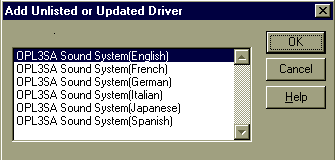
- Double click Unlisted or updated driver in the list.
- Type C:\AUDIO or the path and foldername where you extracted the electronic archive
- Click OK
- Select Language of driver in the list as following.
- Click OK
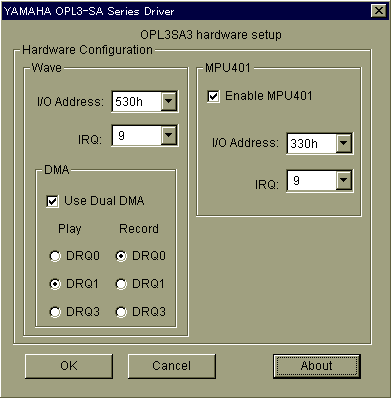
- Set Parameters as described in the following section, then restart your computer
2. Driver SetupWhen you install the driver or run the driver's setting, the following Driver Configuration Box is displayed (e.g. OPL3-SA3 driver ).
Listed below are the possible resources that the driver might use.
WSS (Wave-In/Out, Mixer):
I/O Port: 530h, 540h, 550h, 560hSBPro
I/O Port: 220h, 240h
IRQ: 3 (not supported on OPL3-SA), 5, 7, 9, 11, 15
DMA: 0, 1, 3Full Duplex : <Out 0 In 1>, <Out 1 In 0>, <Out 3 In 1> (OPL3-SA)
In's DMA channel must be different from Out's DMA channel(OPL3-SA2,3)
Control I/O Address: 370h
MPU401:
I/O Port: 330h
IRQ: 5, 7, 9, 10, 11 (OPL3-SA2,3)OPL3
I/O Port: 388h
NOTE: The sound driver must be installed AFTER the installation of the APM subsystem. If the sound driver is installed before APM, the sound will be distorted. Also, if APM is uninstalled, the sound driver must be uninstalled and then reinstalled again.

Copyright © 1997 Toshiba
America Information Systems, Inc.
All Rights Reserved